
School Bus Hub
School Bus Hub is a secure, online portal for parents. Once families create their free account, they can receive real time bus location information. This self service application is fully integrated with the VMax compass routing platform installed on our fleet of buses that allows parents and students to track their school buses.
Families interested in getting their child’s school bus location information must register for a School Bus Hub account. Families can access the School Bus Hub on a web browser using a desktop computer, tablets, smartphones or they can install an app on their smartphone.
| Google Play Store: School Bus Hub application | Apple Store: School Bus Hub application |
|---|---|
Register for School Bus Hub
Information Available on School Bus Hub
Bus Route
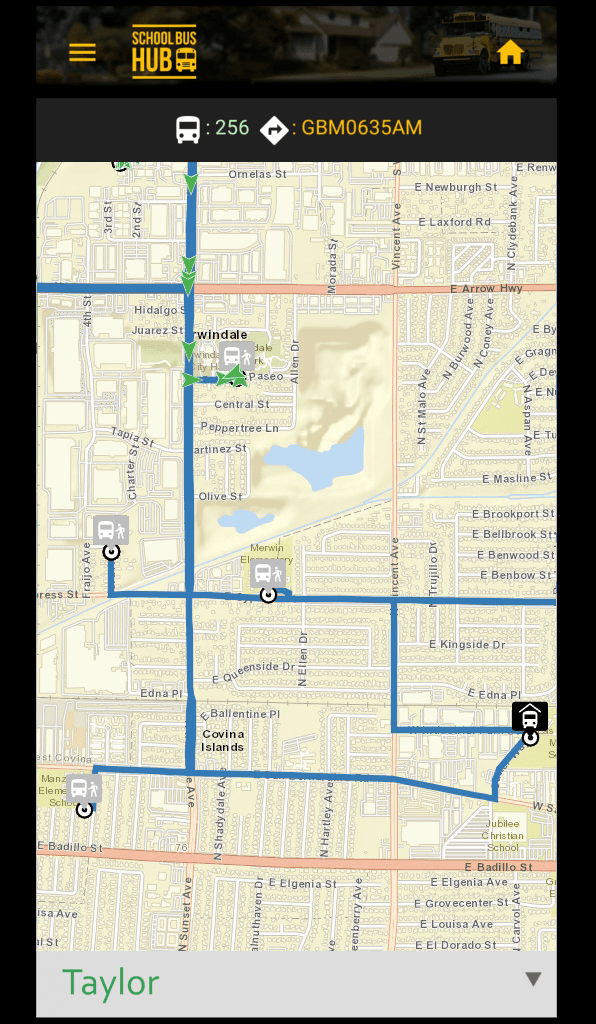
Your child’s bus route will display on the map with a blue line. The route automatically shows when the bus driver starts the bus. Our Department of Transportation has configured the system to only be active during preset windows of time that align with each school’s arrival and departure times.
Current Location of the Bus
The green dot with arrow indicates the current bus location on the route. The arrow indicates direction of travel.
Assigned Bus Stop and School
A blue icon with a student next to a bus marks the location of your student’s assigned bus stop.
Important Information for Parents
In order to create more efficient routes for our drivers and families, the Department of Transportation makes a significant number of route and bus stop changes during the first 3-4 weeks of school. As a result, the School BusHub App may not work for your student during the first month of school (August) until these changes are finalized.
Please review the topics and frequently asked questions available below.
| Do I need an account to access the School Bus Hub? |
Yes. Parents can create their free account at the School Bus Hub registration webpage.
To register, families must provide the following information:
- School District: City of Irwindale
- School
- Student ID Number
- Student Date of Birth
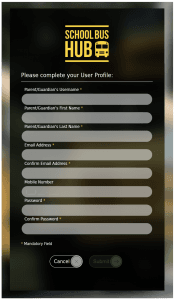
Once this information is verified, families will be prompted to create a user profile with the following mandatory fields:
- USERNAME
- Name (First Name and Last Name)
- Email Address
- Password
Please note: You must activate your new account. School Bus Hub will send an activation email to the address you use to register for an account. The email will come from noreply@schoolbushub.com. Check your junk mail or filters if you don’t see the email within a few minutes of submitting your registration.
| Can I add multiple students to my account? |
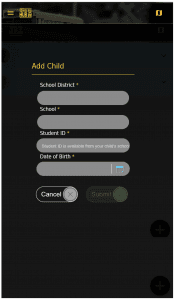
Yes. After an account is created, families can add additional students to their account access. Select “ADD CHILD” on the home screen to add students to your account access.
| How does the School Bus Hub work? |
This self service application is fully integrated with the VMax compass routing platform installed on our fleet of buses. When the bus is en route*, the application allows parents and students to track their school buses.
In map view, families can see -
- their student's assigned bus stop
- the location of the student's school, and
- the current bus location and direction of bus travel.
*For security purposes, bus/schedule/and location information is not available when school bus routes are not in progress.
| How do I access the School Bus Hub? |
Internet Browser
Families can log onto their School Bus Hub account using a web browser on any internet-connected device. Visit the School Bus Hub website to login to your account.
Install the App
Search “School Bus Hub” in your device’s app store or select on the of the following links –
| Who can I contact for support with the School Bus Hub? |
If you experience difficulties registering for or using a School Bus Hub account, please contact Juan
School Bus Hub Set Up Directions
Step 1:
To register a new account, visit the School Bus Hub website using a web browser on a computer/tablet/smartphone. Enter “City of Irwindale” to identify our school district. You must provide your child’s student ID number and date of birth to verify access to the School Bus Hub.
 Step 2:
Create a user profile and to complete registration. You will be sent a confirmation email to verify your email address. Note: Please check your junk email if your confirmation email does not arrive in your inbox.
 Step 3:
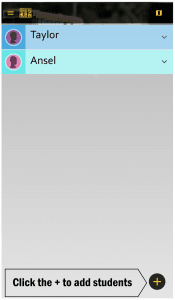
Once registered, log into the School Bus Hub. The home screen displays information about your registered child. To add another child, click on the plus [+] sign.
 Adding a Child:
Parents can add additional children to their account by entering their child’s school district (City of Irwindale), school, student ID number, and date of birth.
 Map View:
In map view, families can see their assigned bus stop, location of the school, and – when active* – current bus location and direction of bus travel.
If you see N/A under Bus Number or Route
There are a few reasons why the blue route may not display and/or “n/a” is shown for the Bus Number and Route information. The most common is when a substitute bus is completing the run.
The computer tracking system is directly linked to a database that assigns a bus to each route. When buses are temporarily removed from service for maintenance or if another bus is assigned to run a route as a substitute, the computer system will not display the route. We are working to improve our workflow to allow for daily updates to the database.
In the event that your student’s route does not display in the morning, we recommend that you bring your child to their assigned bus stop and simultaneously prepare to secure alternate transportation to school in case the bus does not show up.
*For security purposes, vehicle/schedule/and location information is not available when school bus routes are not in progress.